How To Submit A Site To Search Engines Like Google, Bing & Yahoo
Getting listed in Google and the other popular search engines is one of the most effective ways of directing free (or more accurately unpaid), targeted traffic to your website.
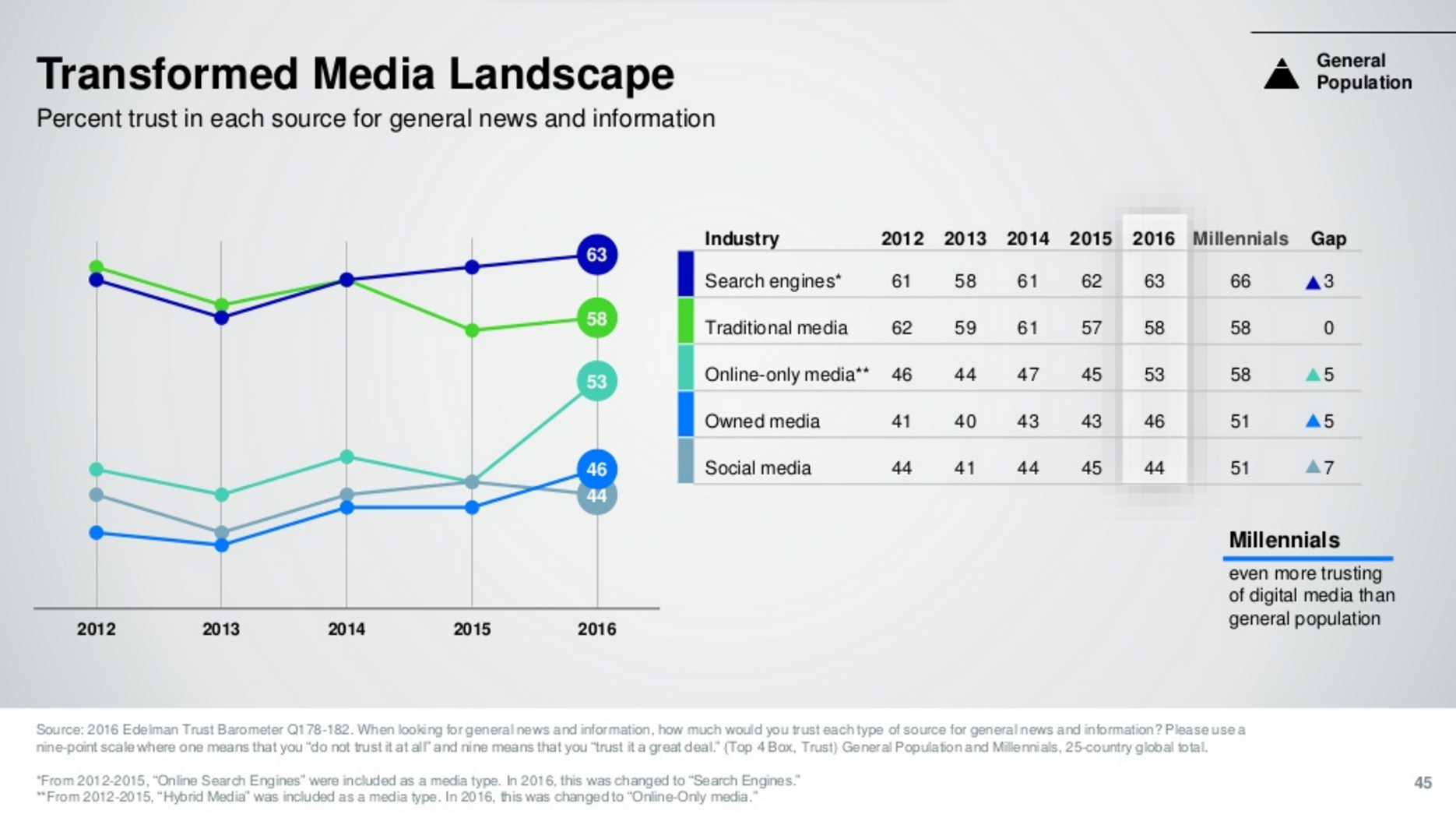
Organic traffic is still the most valuable traffic in the world, in 2017, with search engines still rated the most trusted source for finding news and information:
Here are some tips to help you if you’re a beginner to all this.
Table of Contents
- What Are The Top Search Engines In the UK To Submit My Site?
- Connect Your Website To Google & Other Search Engines
- How Do I Check If My Site Is In Google?
- Why Can’t I Find My Site In Google?
- Do I Need To Pay to Get Into Google, Bing or Yahoo?
- How Do You Submit A Site To Search Engines?
- How Do I Connect My Site With Google Search Console?
- How Do I Verify A Site with Google Webmaster Tools?
- How Do I Automatically Get New Web Pages Into Google?
- Do I Need Links for Google To Find My Site?
- Should I Submit My Site To Directories?
- Which Paid or Free Search Engine Submission Tools and Services Should I Use?
- Why Is My Website Not Listed in Google Search WEEKS or MONTHS After Submitting It?
- Can Social Media Links Get My Site Indexed by Search Engines?
- How Do Search Engines Work Out Where My Website Ranks?
- How Do I Improve My Ranking Position in Google?
- Will Google Find New Pages on My Site?
- How To Put Your Company Logo On Google SERPs
- How Do I Submit a URL To Google Local Business Results?
- Submit Your Site to Google Maps, Google Places for Business and Google+ Local
- How To Improve Your Ranking in Google Local Business Results
- Best Practices for Google Places (From Google)
What Are The Top Search Engines In the UK To Submit My Site?
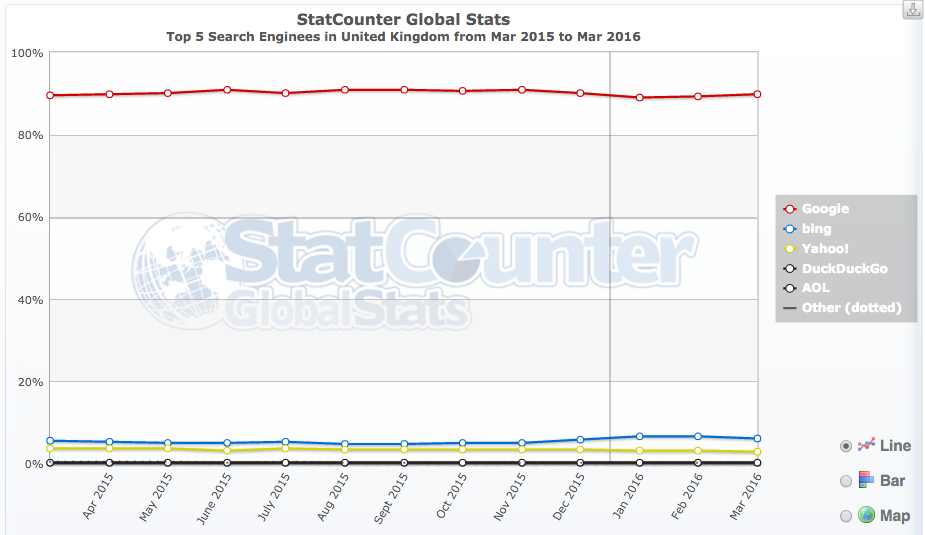
The most popular search engines in the UK are Google, with around 90% of the market share, Bing, and Yahoo. All search engines serve nationwide results, based on the reputation of a website and local results, based on the proximity of the user to the business.
Google, for example, has many country-specific engines (e.g. www.google.co.uk) that help Google deliver more accurate results for UK based users.
Connect Your Website To Google & Other Search Engines
I remember the first time I had to add my site to Google. That was many years ago now, but I had no idea how to do it either.
I didn’t know if I had to register my site with search engines in some special way. I didn’t know if I had to add my site to Google myself or pay them to do it for me. It’s simple for me now – so I wrote this to give you a better understanding of the process (which costs nothing).
This ‘how to’ guide is a primer about getting your small business website into Google, Yahoo and Bing….fast, and free.
Google is the principal driver of traffic in the UK. When it comes to submitting your site to thousands of search engines – well, don’t bother. There is only a handful of players in the UK and most partner with the top global search engines Google and Bing.
Getting your site into search engines is one thing; ranking high in Google, for instance, is another story altogether. I go into both scenarios in this article.
How Do I Check If My Site Is In Google?
Just type your website address into the Google search box. If Google knows about your site, it will tell you. If your site doesn’t feature as the number 1 result, you may need to submit your site to Google. Another way to check if a page is in either of the search engines is to lift a piece of unique text from the page, put it into the search box “in quotes”.
Your page should come up if Google is indexing your site.
Consider also using the info: operator to see if Google knows about your page – e.g. info:www.hobo-web.co.uk or indeed any page from your website site:www.hobo-web.co.uk (Bing too).
In 2017 – I would just put your homepage URL into Google’s search box to ensure Google is serving that page to users. Just being found, and indexed by Google does not mean that your site appears in the main Google results that everyone sees.
Why Can’t I Find My Site In Google?
Search engines like Google need to find your website before it can crawl, index it, rate it and display it in its listings (SERPs – or Search Engine Results Pages).
Googlebot (the spider Google uses) accesses your page if it knows your website exists. Your website can only be listed in Google search if it was crawled and indexed by Googlebot in the first place.
Google may not know about your site, yet.
There are many reasons a site does not rank in Google. My SEO report identifies most of them.
Do I Need To Pay to Get Into Google, Bing or Yahoo?
No. You do NOT have to pay a penny to get your site into any of the major search engines.
You can submit your URL to all the main global search engines entirely for free.
How Do You Submit A Site To Search Engines?
You do not need a SEO (search engine optimizer) to present your site to Google, Yahoo or Bing. You don’t pay to get into any of the big search engines natural (free or organic) listings (and note, Bing powers Yahoo results).
Google has ways of submitting your web pages directly to their index. Most search engines do.
I’d expect submitting your site through the following methods will certainly get you started:
- Submit A Site To Google
- Submit My Site To Bing
- Submit my site to Yandex
- Submit my website to Baidu
- Submit RSS feed to Google
- Submit Google Webmaster Tools
- Submit site to Bing Webmaster Tools
- Submit site to DuckDuckGo (Not Available) – ‘It finds you itself‘)
Submit Your Site To Yahoo(No Need – Bing powers Yahoo in 2017)Submit a site to ASK
How Do I Connect My Site With Google Search Console?
At some point, to rank better in search engines, you are going to have to get other sites to link to it, so you may as well think about that first link on external sites.
In 2017 – that usually means creating useful, accurate and in-depth content that attracts links naturally.
If you want to bypass all that, for now, you can submit your website and verify it in Google Webmaster Tools. The procedure to connect your website is very simple with a little technical knowledge.
How Do I Verify A Site with Google Webmaster Tools?
You have a number of options to verify that you own your website:
- Add a meta tag to your home page (proving that you have access to the source files). To use this method, you must be able to edit the HTML code of your site’s pages.
- Upload an HTML file with the name you specify to your server. To use this method, you must be able to upload new files to your server.
- Verify via your domain name provider. To use this method, you must be able to sign in to your domain name provider (for example, GoDaddy.com or networksolutions.com) or hosting provider and add a new DNS record.
- Add the Google Analytics code you use to track your site. To use this option, you must be an administrator on the Google Analytics account, and the tracking code must use the new asynchronous snippet.


Comments
Post a Comment